Three Minute Theory vs musictheory.net: Which One Fits Your Music Classroom?
An honest side-by-side for music teachers: what students do in each, assignments and grading, pricing as each site lists it, devices and logins, and how to use both.
If you teach music theory, you have probably sent students to musictheory.net. It is free, it runs in any modern browser, and its note, key signature, and interval drills are easy to hand to students. So why would a choir, band, or orchestra teacher look at anything else?
Because the two tools do different jobs. musictheory.net is a free library of lessons and drills that one student works through at a screen. Three Minute Theory is built for teaching theory to a whole ensemble in a few minutes a day, then checking who actually got it. This post compares them side by side: who each one is for, what students do, what teachers get for assignments and grading, pricing as each site lists it, and what you need for devices and logins.
A quick note on fairness. This is the Three Minute Theory blog, so we are not a neutral judge. Every screenshot below is a Three Minute Theory screen. Everything we say about musictheory.net comes from its own public pages (Lessons, Exercises, FAQ, Products, and Tools), checked November 19, 2026 ET, and where it is the better choice, we say so.
The Short Answer
- Choose musictheory.net if you want free, self-paced lessons and drills, you are comfortable building custom exercise links, and you will collect students' Progress Report links yourself.
- Choose Three Minute Theory if you want short video lessons you can teach from in rehearsal, class games and live checks, assignments, and a gradebook in one place, with volumes written for choir, band, and orchestra.
- Use both if you like teaching from Three Minute Theory and want extra free drill for the students who need more reps.
Three Minute Theory vs musictheory.net at a Glance
| Three Minute Theory | musictheory.net | |
|---|---|---|
| Who it is for | K-12 choir, band, orchestra, and general music teachers teaching theory to a class | Anyone learning theory on their own, plus teachers who assign its exercises |
| Lessons | 10 volumes and 100 chapters of video lessons of about three minutes each, run in Live or Independent mode | Free animated lessons, from the staff and clefs through chords, Roman numeral analysis, and Neapolitan chords |
| What students do | Watch a short lesson, answer questions, play review games, take chapter checks | Step through lessons and answer identification, construction, keyboard, fretboard, and ear-training exercises |
| Whole-class tools | Live Review with phones as answer pads, projected chapter quizzes, Live Game Challenge | No class mode is described on its pages; teachers can project a lesson or exercise |
| Assignments | Assign lessons, games, and chapter questions with levels, due dates, and retry settings | Exercise Customizer makes a permanent link to a customized exercise; Challenge Mode adds a question or time limit |
| Grading and evidence | Scores saved to your gradebook; chapter assessments with 10 questions each | Students sign a Progress Report and send you a verification link; you check it with the Code Checker and record the score |
| Pricing as listed | Teacher License $39/month or $349/year, with a free 7-day trial | Website free and without ads; optional paid apps for iPhone and iPad (see musictheory.net/products) |
| Devices and logins | Browser on Chromebooks, iPads, laptops, and smartboards; shared classroom dashboard or individual student logins | Modern browser, no student account; the iOS apps work offline |
Lessons: Animated Slides vs Short Video Lessons
musictheory.net's Lessons page is a free sequence of animated lessons. It starts with The Staff, Clefs, and Ledger Lines and note duration, and it goes much further than most middle school classes need: seventh chords, Roman numeral analysis, nonharmonic tones, cadences, and Neapolitan chords. Students click through each lesson at their own pace. If you have an advanced student heading toward AP Music Theory or a college audition, that depth is a real strength, and it costs nothing.
Three Minute Theory is organized around the time you actually have in rehearsal. There are 10 volumes and 100 chapters, and each lesson is a video of about three minutes. You can run a lesson in Live mode, where you control it for the whole room, or in Independent mode, where students work at their own pace on their own devices. Volume 1 covers music literacy, Volume 2 rhythm, Volume 4 ear training, and the later volumes include a Choir Volume and a Sight Reading volume.
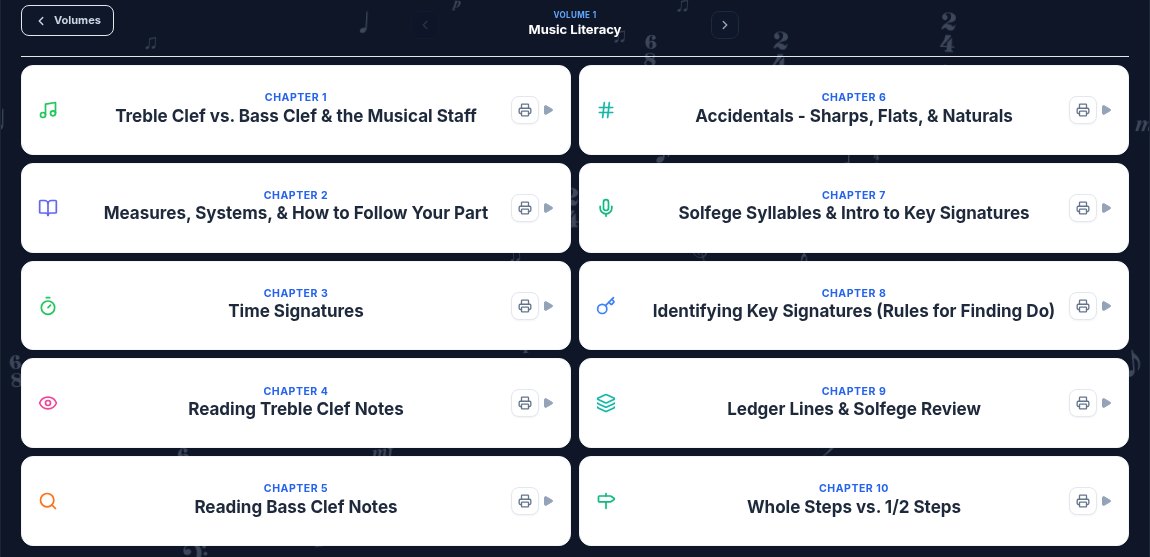
The teacher dashboard for Volume 1, Music Literacy. Each chapter is one short video lesson you can play for the class or assign.
The difference shows up in how you teach. A musictheory.net lesson is a set of animated slides that a student clicks through. A Three Minute Theory lesson is designed to be played for the room, paused, and talked through, then connected to the music on the stands.
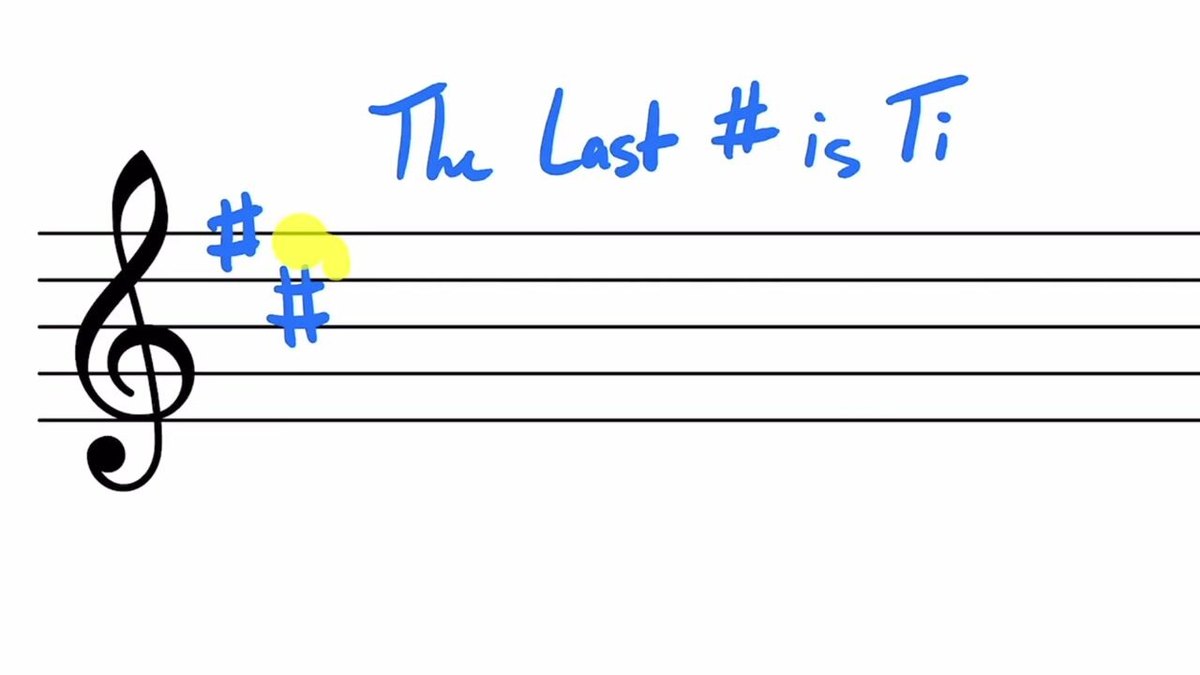
A frame from the Chapter 8 key signatures lesson. Pause here, then have students find the last sharp in the piece they are rehearsing.
For ensembles, the subject matter matters too. The Choir Volume, Volume 9, has chapters written for singers, such as How to Read a Choral Score and How to Find Do. If most of your theory time happens in a choir, band, or orchestra rehearsal, lessons written for those settings save you translation work. See our posts on music theory for choir and music theory for orchestra for examples.
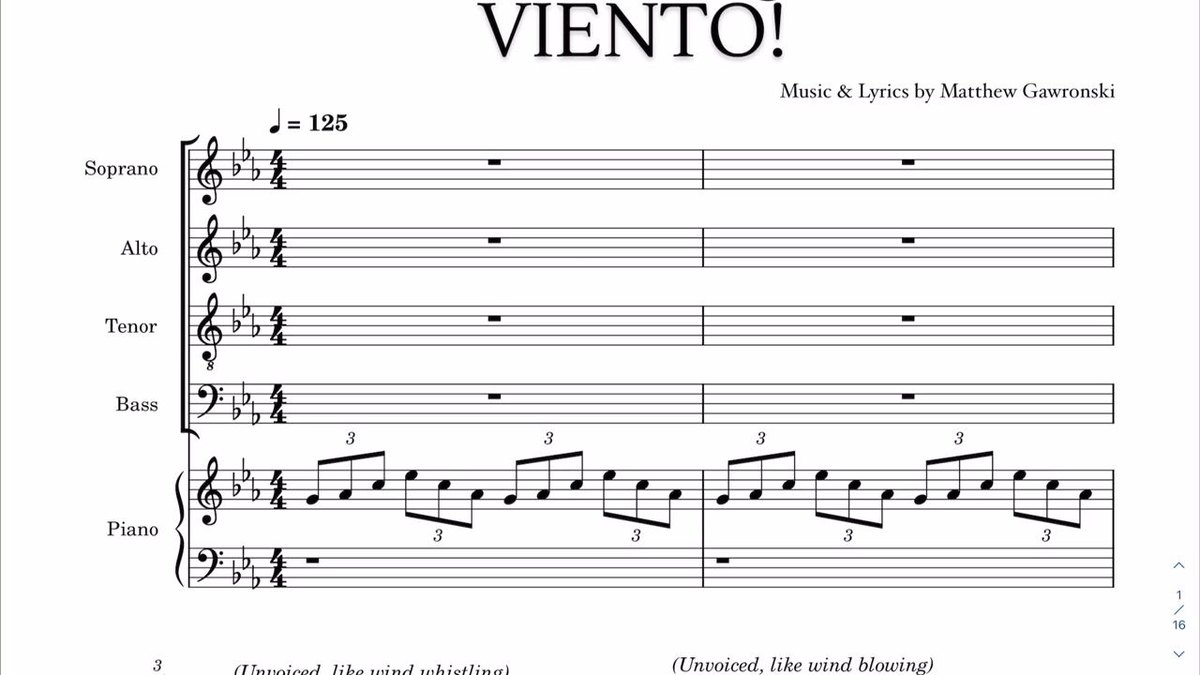
A frame from Chapter 85, How to Read a Choral Score, in the Choir Volume. Singers learn to follow their line in a real SATB score.
Practice: Endless Drills vs Games Built on Each Chapter
This is where musictheory.net shines. Its Exercises page has drills for note, key signature, interval, scale, and chord identification, the matching construction exercises, piano keyboard and guitar fretboard identification, and ear training for notes, intervals, scales, and chords. Every exercise can be customized, and its FAQ explains settings such as key signatures, accidentals, and a note filter. Questions keep coming until the student stops, so it is great for building speed on one narrow skill.
Three Minute Theory practice is tied to the chapter you just taught. There are over 300 content-specific games. TMT Trivia asks questions on a chapter and shows an explanation after each answer, which helps with reteaching. When you assign a game, you can choose a level and mix up to three chapters for review. The Music Tools add practice that uses sound, not just clicks. In Pitchy Bird, a pitch-matching game, a student sings or plays into the microphone and the bird flies in the lane that matches the pitch.
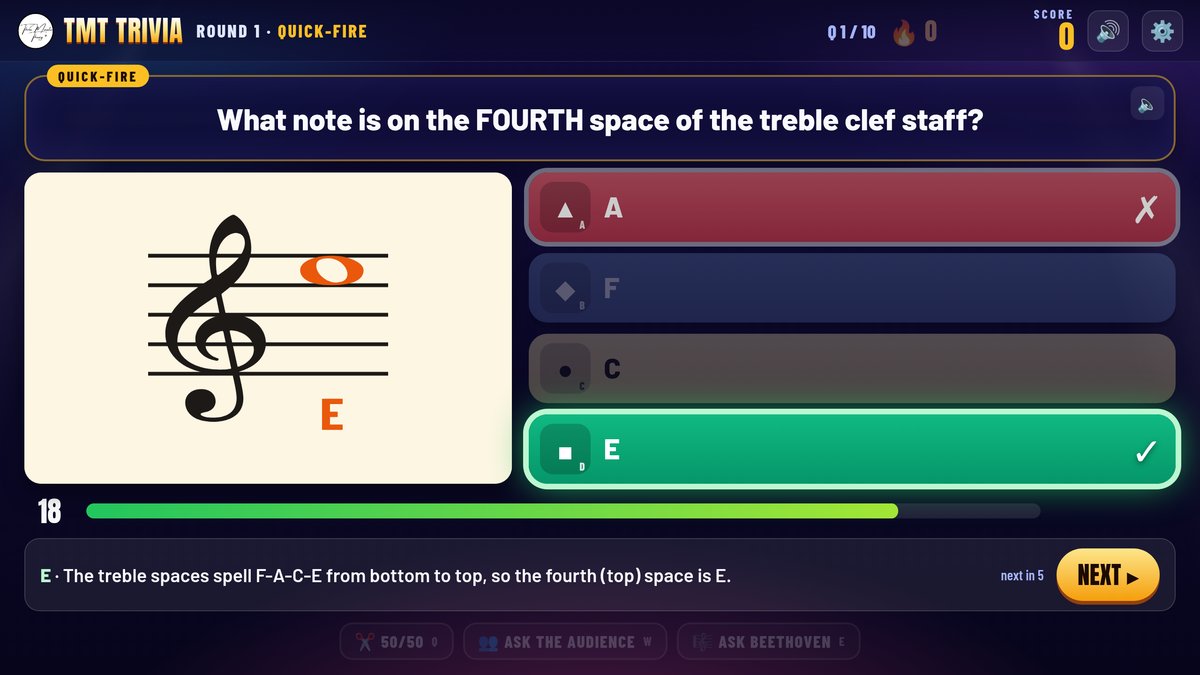
TMT Trivia on treble clef notes. The explanation after each answer turns a wrong answer into a quick reteach.
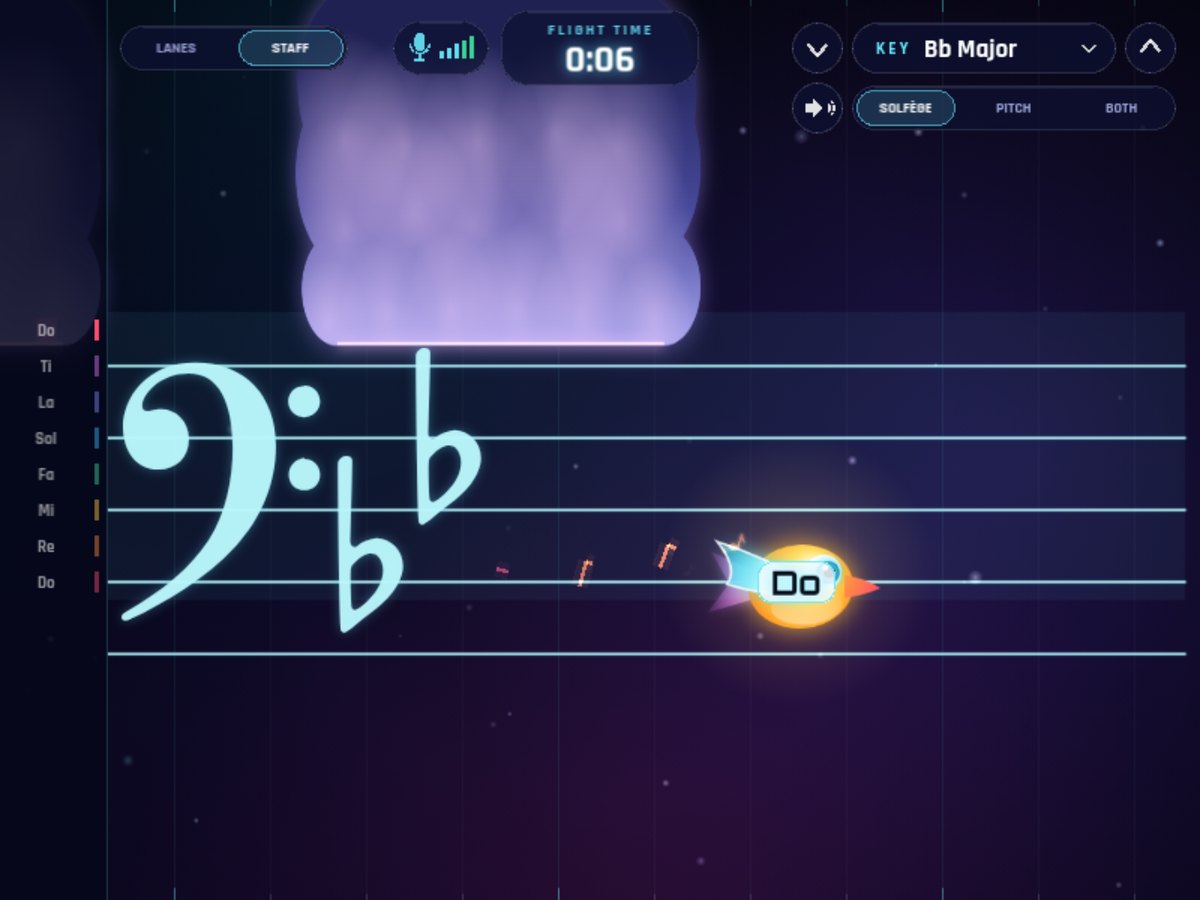
Pitchy Bird in Staff view, set to B flat major for a bass clef instrument. Students sing or play the scale instead of clicking an answer.
If what you need is pure repetition on note names, musictheory.net's drills are hard to beat for the price. If you want practice that feels like a class activity and stays on the same concept as today's lesson, the games are the reason teachers pick Three Minute Theory.
Whole-Class Teaching and Live Checks
musictheory.net's public pages describe lessons, exercises, and homework tools. They do not describe a live class mode, so if you want to use it with the whole room, you project a lesson or exercise and run the discussion yourself.
Three Minute Theory has class tools built in. Live Review plays the lesson on the room screen while student phones become answer pads. Signed-in students tap Join from their dashboard, and a join code works for anyone else. When you reveal an answer, the screen shows how many students picked each choice, so you can see who is confused before you move on. At the end, you can save the scores to the gradebook or keep them as a practice check.
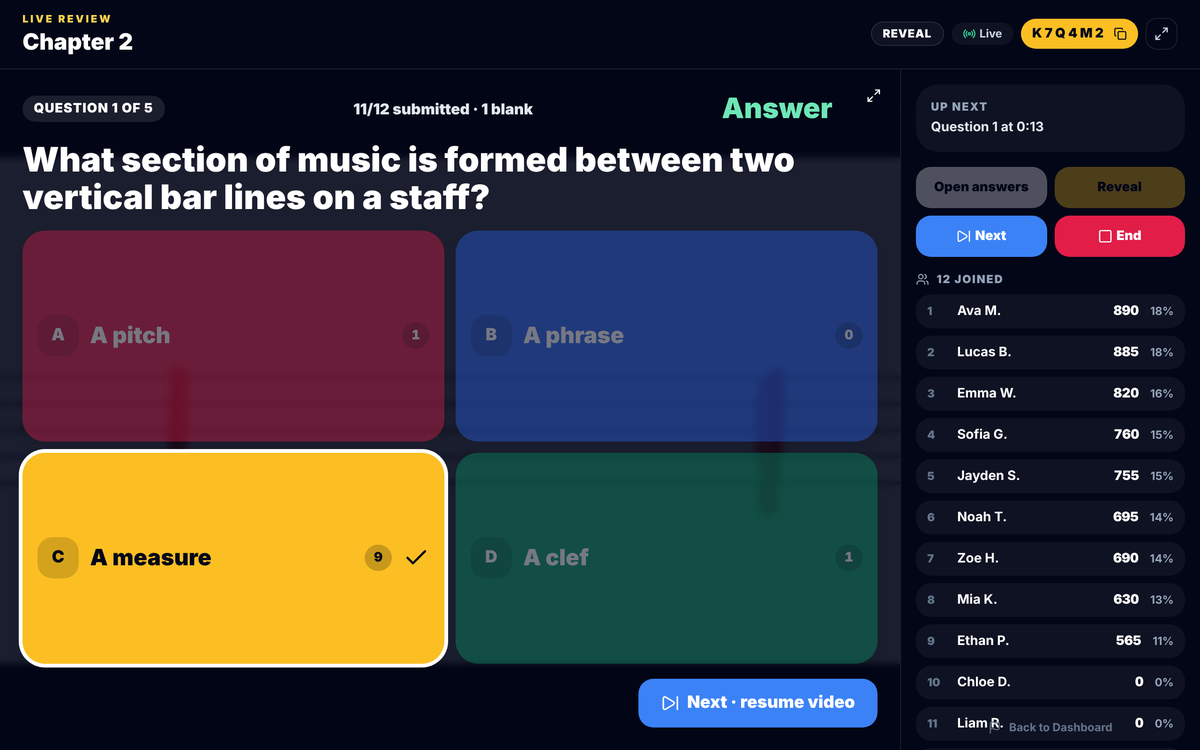
A Live Review answer reveal shows how many students chose each answer, which tells you more than a single class percentage.
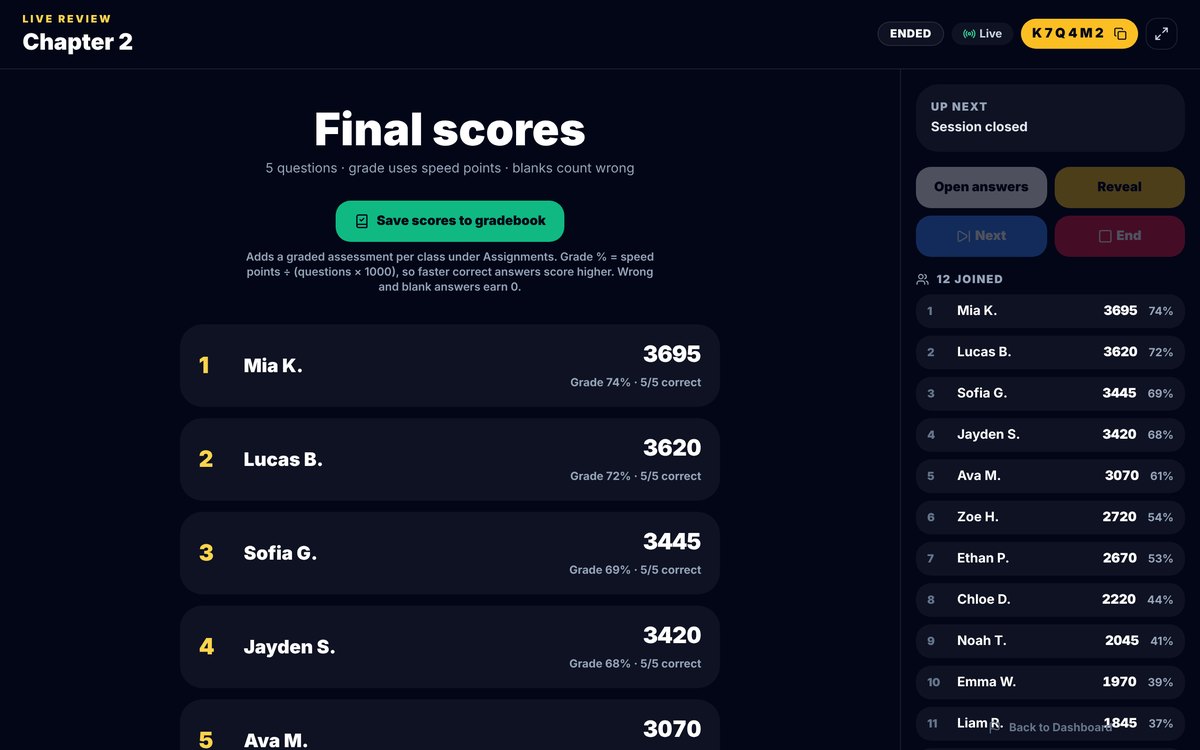
Live Review final scores, with a button to save them to the gradebook.
For a game-day review, the Live Game Challenge lets you pick up to five topics and run them for the whole class, with high scores on the board. For more ideas on quick checks, see music theory exit tickets.

The Live Game Challenge setup: choose the chapters, then pick a game for the whole room.
Assignments, Grading, and Proof of Work
musictheory.net does support homework, and its FAQ explains how. Open the Exercise Customizer under For Teachers, set up an exercise, and copy the permanent link it creates. You can post that link in your learning management system or email it to students. The FAQ recommends Challenge Mode for homework, which adds a question or time limit and stops students from skipping questions. When a student finishes, they sign a Progress Report and send you the Verification Code link. You open it, or paste the code into the Code Checker, to see the original report.
That system is smart about privacy. The FAQ says verification codes are not stored on musictheory.net's servers and recommends students sign with initials instead of their names. The trade-off is that you do the record keeping. There is no class roster or gradebook described on its pages, a lost code cannot be looked up, and you enter each score yourself.
Three Minute Theory keeps the assignment and the result in one place. On the Create New Assignment screen, each chapter row has + Lesson Only, + Full, and + Questions Only buttons, so you can assign just the video, the video with its questions, or only the 10 review questions. You can turn Allow Quiz Retries on or off, choose Show Scores Immediately, and save the assignment to your Sequence Library for next year.
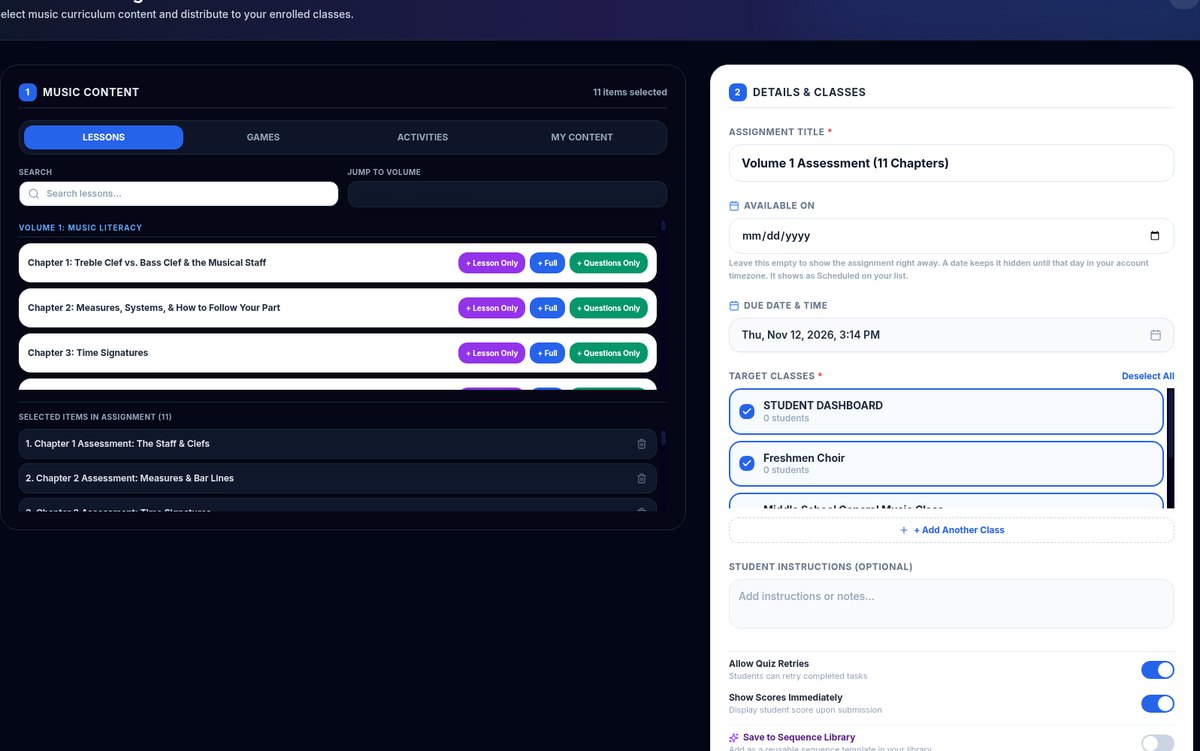
The Create New Assignment screen. Pick a chapter, then add the lesson, the full chapter, or only its questions.
Games can be assigned too. The Assign dialog lets you set a level, add an optional due date, and decide whether students see the class leaderboard.
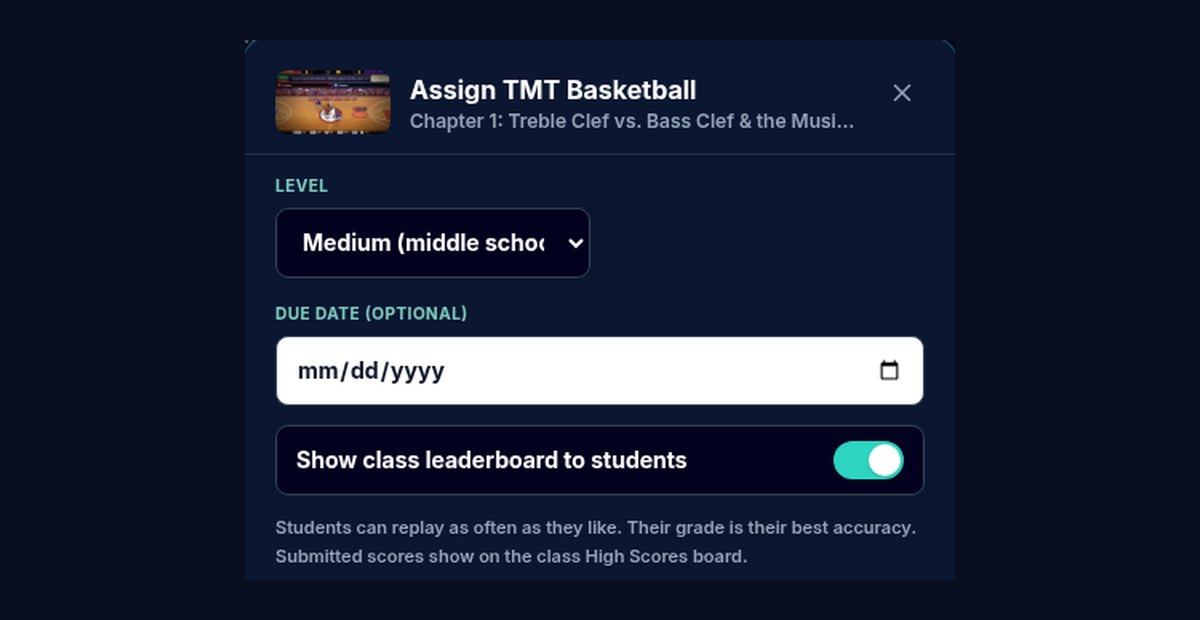
Assigning a game: choose the level, add an optional due date, and turn the class leaderboard on or off.
For unit checks, the Assessments page has a 10-question quiz for each chapter. Every chapter card has a Project Quiz button for a whole-class check and an Assign button for individual work. For more on grading theory without a pile of paper, see our post on music theory quizzes for middle school.
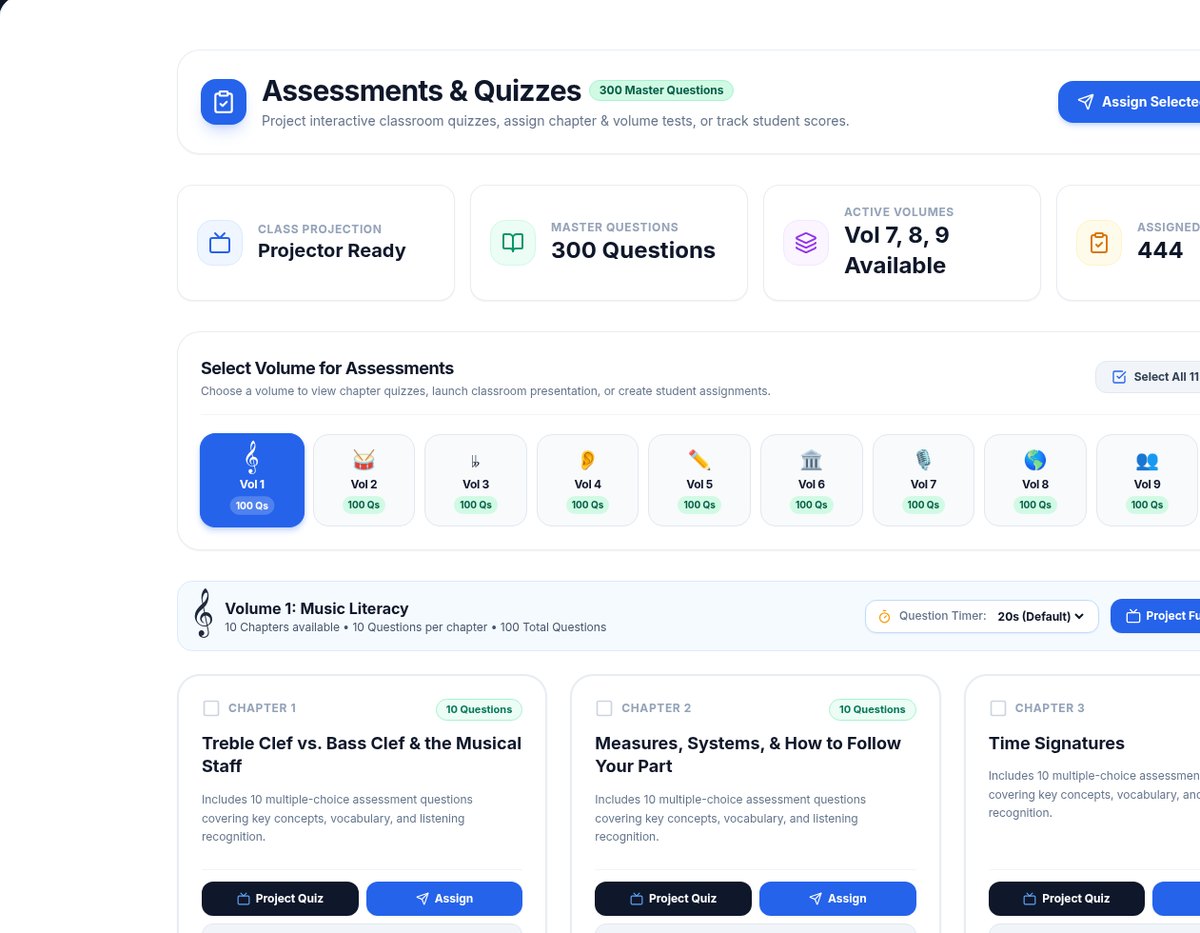
The Assessments page. Project a chapter quiz for the room, or assign it to see each student's score.
Pricing, as Each Site Lists It
musictheory.net: Its FAQ says all content on the site is free and has no ads. The site is supported by optional paid apps for iPhone and iPad. You do not need the apps to use the website. See the current apps at musictheory.net/products.
Three Minute Theory: A Teacher License is $39 a month or $349 a year. One license covers every class you personally teach. It includes all 10 volumes and 100 chapters, over 300 games, unlimited students on your shared classroom dashboard, and 25 individual student logins. You can try it free for a week with no card, though printable PDFs stay locked during the trial. Schools can also pay with a purchase order. See the monthly and yearly plans at ThreeMinuteTheory.com.
If your budget is zero, musictheory.net wins on price, and we would rather you use it than nothing. The question is whether the class tools, games, and gradebook save you enough time to be worth paying for.
Devices and Logins
musictheory.net runs in a modern browser. Its FAQ lists the supported browsers for the school year as Safari 15.4 or later, Chrome 100 or later, Edge 100 or later, and Firefox 115 or later, and it keeps older editions of the site for devices that cannot update. Audio needs WebAssembly and the Web Audio API, and the FAQ notes that Microsoft Edge's Enhanced Security mode needs an exception for the site. Students do not need an account. The iOS apps work without an Internet connection on iOS 15.8 or later.
Three Minute Theory works in the browser on Chromebooks, iPads, laptops, and smartboards. You can teach from a shared classroom dashboard that stores no student names, or give students individual logins when you want individual scores. For days when devices are not an option, the chapter worksheets print for paper practice.
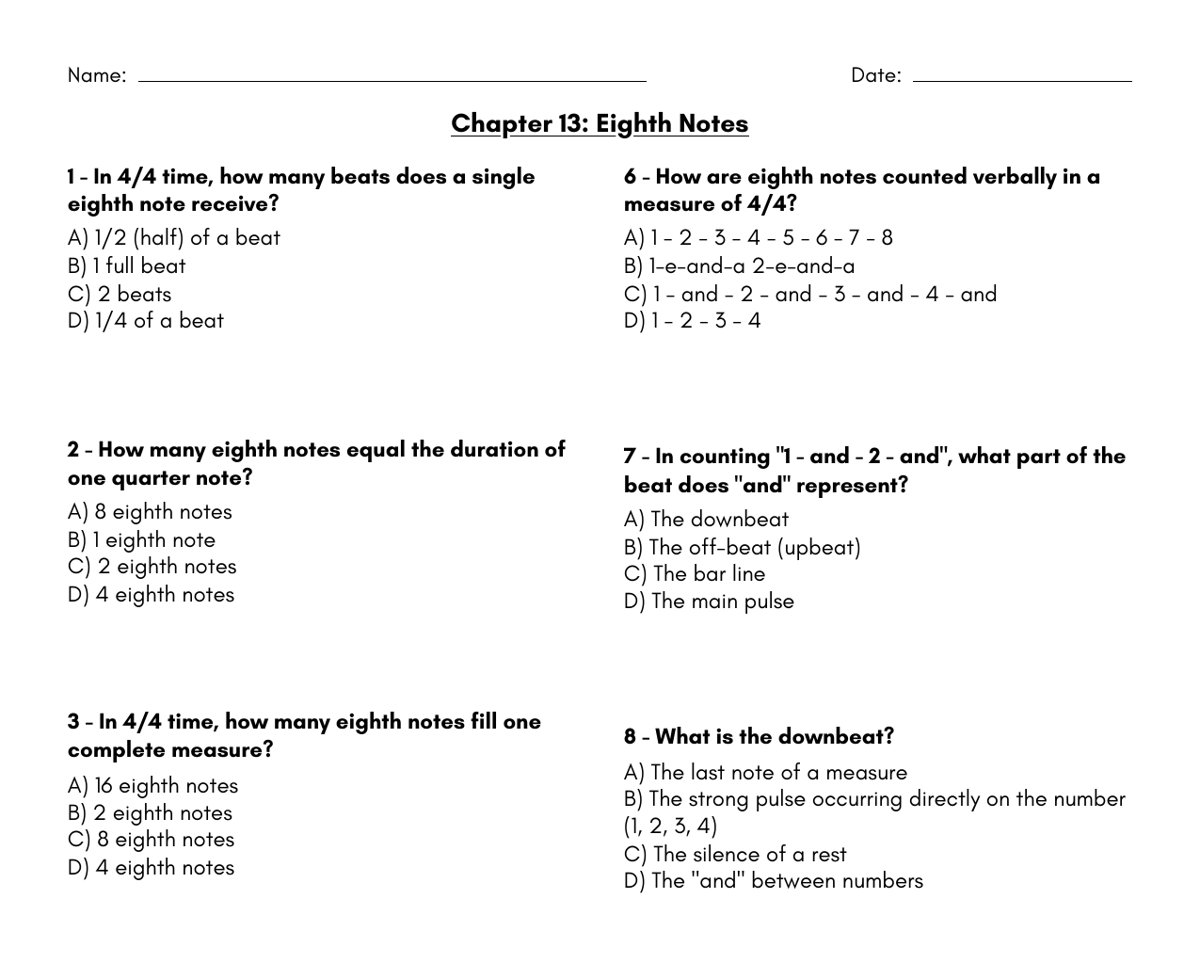
The Chapter 13 Eighth Notes worksheet, a paper backup for days without devices. Printables are included with a paid license.
When to Choose Each
Choose musictheory.net when
- You need a free resource and cannot buy a license this year.
- You want unlimited drill on one narrow skill, such as note names or intervals.
- An advanced student needs college-level harmony topics like Roman numeral analysis or Neapolitan chords.
- You are happy to collect Progress Report links and enter scores yourself.
- Students need an offline option on iPhone or iPad.
Choose Three Minute Theory when
- You want to teach theory to the whole ensemble in a few minutes of rehearsal, not send students off to a website.
- You want short video lessons written for choir, band, orchestra, and general music.
- You want games, live checks, and chapter quizzes that match the lesson you just taught.
- You want assignments and scores in one gradebook instead of a stack of verification links.
- You teach several classes and want one license to cover all of them.
How to Use Both Together
You do not have to pick only one. A simple week can look like this:
- Monday: Play the Three Minute Theory lesson on key signatures for the whole ensemble, then find the key in the piece on the stands.
- Wednesday: Run a three-question Live Review or a TMT Trivia round to see who has it.
- Thursday: Students who missed it get a musictheory.net Key Signature Identification link set up in the Exercise Customizer, with Challenge Mode on, for extra practice.
- Friday: Use the Volume 1 chapter quiz on the Assessments page for the grade.
Keep the concept and the difficulty the same across both tools, and do not assign the same practice twice. For a broader look at choosing tools, see the best music theory app for middle school and our quick comparison page.
Frequently Asked Questions
Is musictheory.net free?
Yes. Its FAQ says all content on the website is free and has no ads. The site is supported by optional paid apps for iPhone and iPad. See musictheory.net/products for those apps.
Is Three Minute Theory free?
No, but you can try it free for 7 days with no card. After that, a Teacher License is $39 a month or $349 a year, and one license covers every class you personally teach.
Can I assign musictheory.net exercises as homework?
Yes. Use the Exercise Customizer to create a permanent link to a customized exercise, turn on Challenge Mode so students cannot skip questions, and have students sign a Progress Report and send you the verification link.
Does musictheory.net have student accounts or a gradebook?
Its public pages describe Progress Reports and a Code Checker rather than student accounts or a gradebook. Verification codes are not stored on its servers, so you collect the links and record scores yourself.
Which is better for choir, band, or orchestra?
For teaching theory to a whole ensemble in rehearsal, Three Minute Theory is built for that, with short video lessons, a Choir Volume, live checks, and class games. For individual drill on one skill, musictheory.net is a strong free option.
Can I use Three Minute Theory and musictheory.net together?
Yes. Teach and check the concept with Three Minute Theory, then give students who need more practice a customized musictheory.net exercise link on the same skill.
Does Three Minute Theory work on Chromebooks and iPads?
Yes. It runs in the browser on Chromebooks, iPads, laptops, and smartboards. You can use a shared classroom dashboard or individual student logins.
Want to see the classroom side for yourself? Start a free week or see the monthly and yearly plans at ThreeMinuteTheory.com.